
News & Blogs

Hand selecting digital checklist on virtual screen representing dental billing coding process, accurate claim submission, insurance verification, and revenue cycle management.

Expert Dental Billing & Accurate Coding Solutions:

In today’s competitive dental industry, efficient dental billing coding is essential for maintaining healthy cash flow and reducing claim denials. Qiaben Health provides reliable and professional solutions that simplify the entire billing process for dental practices. With expertise in accurate coding, timely claim submission, and revenue cycle management, Qiaben helps dental offices improve reimbursements while focusing on delivering exceptional patient care. CODING EXPERTS:

Futuristic medical office scene showing a glowing AI brain analyzing billing data dashboards, highlighting missed procedure codes, underpaid claims, eligibility errors, and unresolved denials. A professional woman interacts with digital charts displaying clean claim rate and revenue metrics, while money bags on a cracked floor symbolize financial leakage and recovery through proactive revenue oversight.

How Intelligent Billing Analytics Identify Patterns That Leak Revenue

Revenue Leakage in Billing Patterns Revenue rarely disappears overnight. It leaks slowly through missed procedure codes, underpaid insurance claims, eligibility errors, and unresolved denials. Most practice owners do not notice the issue until cash flow tightens, accounts receivable crosses 60 days, or insurance reimbursements slow down. The reality is simple: revenue leakage hides inside billing patterns. Modern billing analytics platforms are built to

Digital illustration titled “How AI Identifies Billing Patterns That Leak Revenue – Stop the Financial Drip,” showing a glowing AI brain scanning a leaking glass pipeline with red laser beams. Water drips from cracks into a puddle while a transparent tank labeled “PROFIT” collects revenue, symbolizing AI detecting and preventing financial leakage. A green “Get TCO Calculator” button appears in the corner.

Preparing for an Audit: 8 Documents Every Practice Must Keep

Revenue Leakage in Dental Billing It leaks slowly through missed procedure codes, underpaid insurance claims, eligibility errors, and unresolved denials. Most practice owners do not notice the issue until cash flow tightens, accounts receivable crosses 60 days, or insurance reimbursements slow down. The reality is simple: revenue leakage hides inside billing patterns. Modern AI billing systems are built to detect those patterns early

Digital illustration showing a cracked gear being repaired with puzzle pieces, symbolizing dental coding errors and claim denials, with the headline “Dental Coding Mistakes That Trigger Denials (and How to Fix Them)” on a blue technology-themed background.

Dental Coding Mistakes That Trigger Denials and How to Fix Them

Dental claim denials rarely begin with the insurance company. They usually start inside the practice with small coding or documentation gaps that go unnoticed until reimbursement slows down. If your clean claim rate is declining, accounts receivable days are increasing, or the same denial remark codes appear month after month, coding accuracy requires immediate review. This guide explains the most common dental coding

Infographic titled “HIPAA & Cloud EHR: 6 Security Questions – Protecting Patient Data, Billing & Revenue” featuring a glowing blue shield with a lock inside a cloud, displayed in a server room background. At the bottom, six security questions are listed: Sign BAA? Data Encrypted? User Access? Backups & DR? Threat Monitor? Risk Assessments.

HIPAA & Cloud EHR: 6 Security Questions to Ask Your Vendor

Cloud EHR Security Checklist for HIPAA Compliance and Insurance Protection A cloud EHR can improve workflow efficiency, telehealth integration, dental billing accuracy, and insurance claim processing. However, one weak security layer can expose Protected Health Information, delay reimbursements, trigger HIPAA penalties, and damage patient trust. If your system stores patient demographics, insurance details, CDT and CPT codes, payment data, or claim attachments, security

Feature image showing a dental revenue cycle management (RCM) dashboard with charts, graphs, and five key KPIs—clean claim rate, AR days, net collection rate, denial rate, and patient collections—highlighted with icons, a magnifying glass, and an upward revenue trend to illustrate how to read RCM performance metrics.

How to Read Your RCM Dashboard: 5 KPIs That Matter

How to Read Your RCM Dashboard and Understand the KPIs That Matter Most practices look at their RCM dashboard. Very few actually read it. If your accounts receivable keeps rising, insurance denials are increasing, or cash flow feels unpredictable, your KPIs are already warning you. The question is are you acting on them. This guide explains how to read key performance indicators in

Isometric 3D infographic titled 'Telehealth Integration: Best Practices for Patient Adoption' featuring a doctor and patient in a virtual consultation on a computer screen. The image illustrates healthcare benefits like revenue cycle management, EHR and billing system integration, improved patient adoption, and better follow-ups using vibrant cyan icons and circuit-style graphics on a dark grid background.

Telehealth Integration: Best Practices for Patient Adoption

Telehealth Integration for Stronger Patient Adoption and Revenue Growth Healthcare delivery is changing fast. Clinics that delay telehealth integration are already seeing missed appointments, slower reimbursements, and lower patient engagement. If you want stronger patient retention, cleaner dental billing, faster insurance approvals, and better clinical outcomes, telehealth must move from optional to operational. This guide explains how to integrate telehealth the right way

A pediatric healthcare professional stands beside a mobile monitor and points to a digital medical record during a well-child visit. The screen displays a form titled “Well-Child Visit: 9 Months” with multiple fields and sections. Two other clinicians in blue scrubs stand nearby, observing the screen. A mother and father sit on an exam bed with their young child, who is watching the presentation. The room is bright and welcoming, with a large window letting in natural light, soft blue walls, and children’s toys stacked neatly in the corner. A small cabinet with medical supplies is visible beside the monitor. The scene conveys a calm, professional environment where caregivers and medical staff collaborate using digital health technology to review a child’s care information.

Top 7 EHR Templates Every Pediatrician Needs

Most pediatricians don’t wake up thinking about templates. Most pediatricians don’t wake up thinking about templates. They think about packed schedules, parents with questions, and charts that somehow always need finishing at the end of the day. Over time, though, many clinics realize the problem isn’t the EHR itself — it’s how the documentation is set up. Templates, when done right, quietly remove

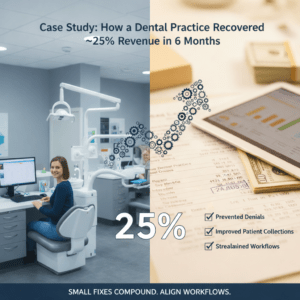
A split-screen graphic for a dental practice case study. On the left, a professional dental office setting with a staff member at a computer. On the right, a digital tablet displaying financial growth charts and a checklist highlighting "Prevented Denials," "Improved Patient Collections," and "Streamlined Workflows." A large "25%" graphic and an upward-trending arrow made of gears connect the two sides, illustrating a 25% revenue recovery over six months.

Case Study: How a Dental Practice Recovered ~25% Revenue in 6 Months

This case study follows a small, multi-operatory dental practice offering general and restorative care. The team had been stable for years, patient demand was consistent, and clinical quality was not the issue. Still, leadership felt something was off. Collections were unpredictable. Some months looked fine, others dipped without a clear explanation. Staff blamed insurers. Insurers blamed missing information. Meanwhile, aged balances kept growing

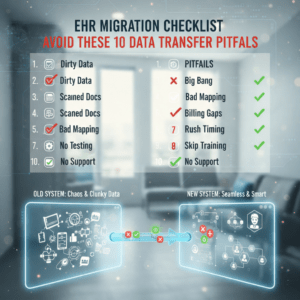
An infographic titled "EHR Migration Checklist: Avoid These 10 Data Transfer Pitfalls," featuring a side-by-side comparison of a cluttered "Old System" and a streamlined "New System" connected by a digital data transfer bridge. A central checklist highlights common migration risks such as "Dirty Data," "Bad Mapping," "Billing Gaps," and "Skip Training" with red and green status icons against a blurred clinical office background.

EHR Migration Checklist: Avoid These 10 Data Transfer Pitfalls

Most clinics don’t decide to switch EHRs on a whim. It usually happens after months of frustration slow charts, poor reporting, billing friction, or staff saying, “There has to be a better way.” What surprises many teams is that choosing the new EHR is often the easy part. The real risk sits in the migration itself. When data moves from one system to

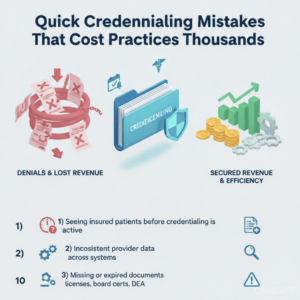
Infographic titled “Quick Credentialing Mistakes That Cost Practices Thousands” showing a comparison between “Denials & Lost Revenue” with red denial papers and broken chain graphics, and “Secured Revenue & Efficiency” with a rising bar chart, coins, and gears. It lists three mistakes: seeing insured patients before credentialing is active, inconsistent provider data across systems, and missing or expired documents such as licenses, board certifications, and DEA.

Quick Credentialing Mistakes That Cost Practices Thousands

Credentialing feels like paperwork until it becomes a revenue problem. One small oversight  a missing signature, an outdated license number, or a failed recredentialing reminder  can turn clean claims into denials, push revenue into aging AR, and eat up staff hours fixing avoidable errors. Below are the most common credentialing mistakes, why they happen now, and the practical fixes that actually work in